
Installation
Primer installs in about ten minutes.
No servers to buy, no consultants to schedule. Download Primer, run a single command, and open it in your browser. Here is every step, exactly as it looks on your screen.
Download Primer
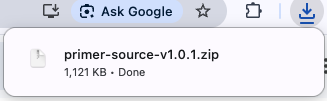
After you buy, you receive a single zip file: the complete Primer source code. Download it and double-click to unzip. That folder is your copy of Primer, to keep forever.
For reference: what your screen should look like
The last mile
Hand two things to your IT team
What you just did runs Primer for evaluation. To roll it out across your company, your IT team connects two things, just once. Both are standard, everyday work for any IT department.
Connect who’s who
Tell Primer how your company already signs in. IT can connect it to email, Okta, Microsoft Entra, Google Workspace, or any SSO/SAML system you already use, so people log in with the accounts they already have.
Connect your database
Point Primer at your own PostgreSQL database: Amazon RDS, Google Cloud SQL, Azure, Neon, or one your team runs in-house. Your data lives in your database, on your infrastructure.
Both connections are a one-time setup. Nothing here phones home, and DavidPM has no access to your installation.
Want the full technical detail?
The deployment guide covers every option: direct install, Docker, and integrating with infrastructure you already operate.
See deployment options